What Is a Skill, and How Does It Differ from an App?
A new conversation does not automatically retain the background or procedures you provided previously. A Skill addresses this limitation by storing reusable instructions for the model. This chapter explains what a Skill is, how it differs from an app, where Pi Agent stores it, and how the model discovers it. Chapters 15 and 16 cover installation and authoring.
Why learn about Skills?
Chapter 7 showed you how to start a conversation, and Chapter 4 introduced the workspace. One limitation soon becomes clear: you must provide the same background again in each new Session.
- “Review this refrigerator photo and list the items that are close to expiring.” The model may first need to ask about your refrigerator layout, how you categorize food, and where you store meat.
- “Help me schedule this week’s household chores.” The model may need to ask how many people are in the household, who is responsible for each task, and whether the schedule covers weekdays or weekends.
- “Write an automation that turns off the living-room lights at night.” The model may need the light’s entity_id, your Home Assistant version, and whether the automation should use a device or entity trigger.
Repeating this background and the correct procedure wastes both your time and input tokens, as discussed in Chapter 9. Results can also become inconsistent when a repeated explanation omits an important detail.
A Skill stores these reusable instructions. At the start of a new Session, Pi Agent makes a summary of the Skill available to the model. When a request matches, the model can read the full procedure instead of asking you to provide it again.
Skills help Pi Agent apply your established procedures consistently. The essential concept is simple: a Skill is a reusable operating guide for the model.
A Skill is an operating guide
A Skill records the instructions needed to perform a recurring task. For example, household procedures might specify:
- how to separate general waste and food waste;
- how to check date labels, set aside expired food for review, and avoid discarding it without approval; and
- where to dry white clothing, dark clothing, and items that must be kept out of direct sunlight.
Without a written procedure, these details can be forgotten or applied inconsistently. Waste may go into the wrong bin, food may be discarded before it is reviewed, or clothing may be dried incorrectly.
A Skill turns the procedure into persistent, reusable instructions. Pi Agent can make those instructions available whenever a relevant request arises, even in a new Session.
Its key characteristics are:
| Operating-guide characteristic | Skill equivalent |
|---|---|
| Stored in a defined location | Stored under /data/pi-agent/skills/, where Pi Agent can discover it |
| Available without repeating the instructions verbally | The model can read the Skill instead of requiring you to paste it into every conversation |
| Written once and reused | Installed once and made available to each new Session |
| Identified by a title and summary | Identified by the name and description fields at the start of SKILL.md |
| Detailed sections consulted only when required | The model initially receives a summary and reads the full instructions when needed |
Skills vs mobile apps vs HACS integrations
Mobile apps and HACS integrations may already be familiar from Chapter 4. A Skill may appear similar because it extends what a system can do, but it works in a fundamentally different way:
| Characteristic | Mobile app | HACS integration | Pi Agent Skill |
|---|---|---|---|
| Purpose | Standalone executable software | An extension to Home Assistant, usually implemented in Python | Plain-text instructions for the model |
| How it operates | Runs directly on the mobile device | Runs in Home Assistant’s Python environment | The model reads the instructions and determines how to apply them |
| How it is invoked | You open or operate the app | It remains available after installation and responds to configured events or conditions | The model selects a relevant Skill based on the request |
| File type | APK or IPA binary | Python files and a manifest | Markdown text in SKILL.md |
| Recovery after reinstallation | Must be reinstalled | Must be reinstalled | Stored in the add-on’s /data/ directory and restored if that data is included in a Home Assistant backup; see Chapter 20 |
| Authoring requirements | Knowledge of Kotlin or Swift | Knowledge of Python and Home Assistant architecture | Ability to write clear Markdown instructions; see Chapter 16 |
| Security review | Subject to app-store review | May receive community scrutiny through HACS | No mandatory review; you must inspect the contents before installation |
The key distinction is that a Skill is guidance, not an independently executing program. An app or integration adds executable behavior. A Skill gives the model task-specific instructions to interpret when relevant.
/config/. Tool permissions and approval prompts provide boundaries, but they do not replace review. Read the entire SKILL.md file before enabling a Skill, and reject any unexpected file, network, or deletion action.Where are Skills stored?
Pi Agent stores Skills in a fixed location:
/data/pi-agent/skills/
├── fridge-check/
│   ├── SKILL.md
│   └── examples/
│       └── sample-photo-analysis.md
├── ha-automation-templates/
│   ├── SKILL.md
│   ├── motion-light.yaml
│   └── arrive-home-ac.yaml
└── video-pitch/
    ├── SKILL.md
    ├── narrator-voice-config.md
    └── scene-templates/
        └── intro.html
Keep the following points in mind:
- Each Skill has its own folder. The folder name identifies the local Skill, such as
fridge-check. - Each Skill folder must contain
SKILL.md. Pi Agent skips folders without this primary file. - Supporting files may include YAML templates, examples, and reference documents. The primary file can instruct the model to read them only when needed. This progressive-disclosure pattern keeps unnecessary detail out of the initial context.
- The
/data/pi-agent/skills/directory is in the Home Assistant add-on’s persistent/data/area. Inside the container, the~/.pi/agent/skillssymbolic link points to the same location so that the CLI and UI use the same files. Home Assistant full backups include add-on/data/by default, so Skills are restored when that data is backed up. The 720MB video-tools cache is intentionally excluded from backups and should be treated separately.
You normally manage these files through the Skills panel rather than editing the directory directly. Chapter 15 covers that workflow. Knowing the path is still useful for troubleshooting.
How Pi Agent makes Skills available to the model
Once you understand what a Skill is and where it is stored, the next question is: How does the model know which Skills are installed? The model does not scan your folders itself. Pi Agent performs the discovery process when it prepares a conversation.
Step 1: pi-web scans the Skills directory
When the Skill list needs to be refreshed—usually when you select “New conversation” to start a new Session, although some versions also refresh it when you open the conversation panel or select “Reload Skills”—the pi-web backend scans /data/pi-agent/skills/ for every */SKILL.md file. It reads the opening YAML frontmatter and extracts each Skill’s name and description. Current versions do not provide reliable real-time file monitoring, so after changing SKILL.md on the file system, start a new Session to ensure that Pi Agent scans it again.
Step 2: Pi Agent adds the available-Skills list to the system prompt
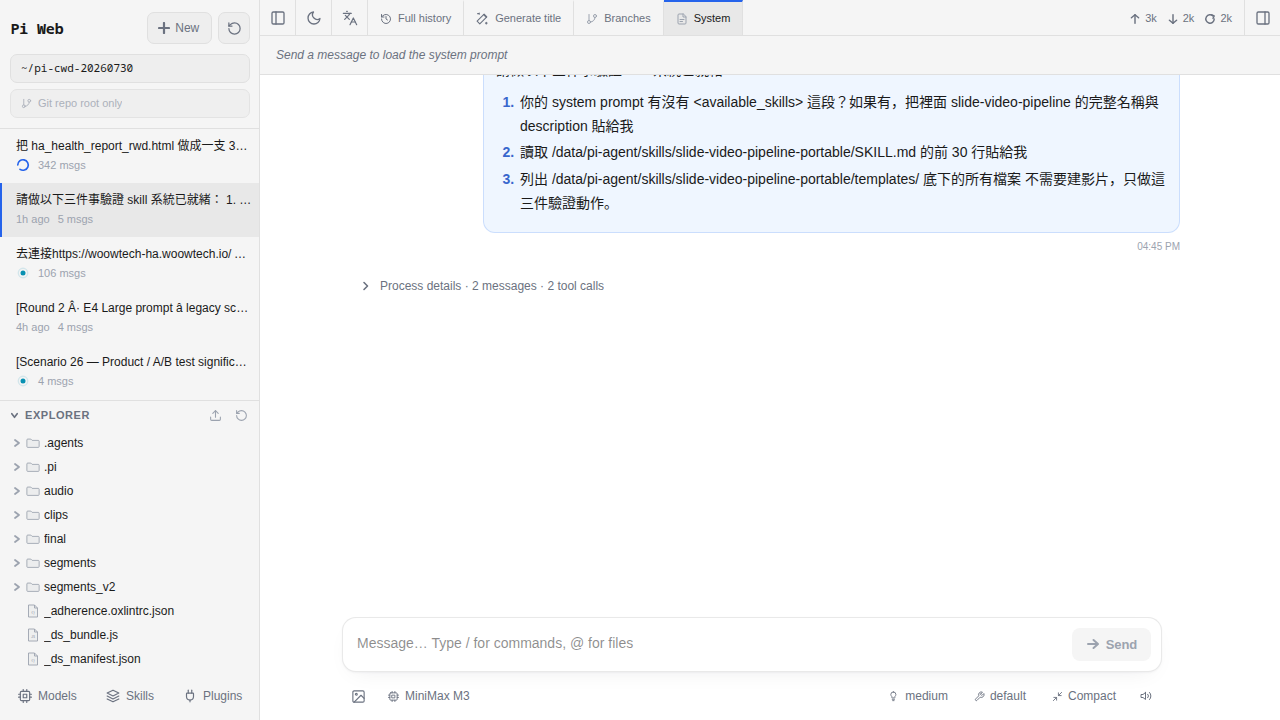
Pi Agent formats the extracted entries and adds them to the system prompt. The exact wrapper varies by Pi Agent and pi-coding-agent version; it may use <available_skills>, <skills>, or a Markdown section. The important information is the list of names and descriptions:
<available_skills>
- fridge-check: Give photos of ingredients in the fridge to help users list items nearing expiration, suggestions for dinner dishes
- ha-automation-templates: Common HA automation templates (motion detection lights on, home air conditioning, etc.)
- video-pitch: Produce a 60-second subtitled product introduction video
</available_skills>
The model begins the Session with this summary of available capabilities. Open the System prompt panel to inspect the exact list provided by your installed version.
Step 3: The model decides whether a Skill applies
If you ask, “Review this refrigerator photo and list the items that are close to expiring,” the model can match the request to fridge-check. It then reads the complete fridge-check/SKILL.md file, including its procedure, cautions, and references, and follows those instructions.
For an unrelated request, the model can ignore the Skill list and respond normally.
description with a specific trigger and task. “Handle food-related questions” is too vague. “When the user shares a refrigerator photo, list food that is close to expiring and suggest a dinner dish” clearly indicates when the Skill applies. This discovery mechanism follows the SKILL.md convention used by mattpocock/skills.5 common Skill categories
Skills can support many kinds of work. In practice, most examples fit into five broad categories:
| Category | Typical examples | Purpose | Potential users |
|---|---|---|---|
| Household tasks | Waste sorting, refrigerator inventories, chore schedules, and pet-feeding records | Record household rules so that the model applies the same procedure each time | Households with children, shared chores, or recurring routines |
| Home Assistant automation templates | Motion-activated lights, arrival-based climate control, sunrise curtains, and alarm-triggered coffee makers | Provide reusable YAML structures for common scenarios instead of generating each automation from the beginning | People learning Home Assistant who want to start from established templates |
| Video production | pitch_video for a 60-second product introduction, instructional narration, and TikTok videos | Define a format such as an opening hook, 3 key benefits, and a closing call to action; Chapter 17 demonstrates this workflow | Creators building video pipelines with Pi Agent |
| Data processing | CSV analysis, log interpretation, invoice organization, and household-expense classification | Apply a consistent procedure to structured data | People who provide exported data to the model for analysis |
| External tools | Notion, Google Calendar, LINE Notify, and Telegram bots | Explain how to call an external tool’s API and which parameters to provide | People integrating additional cloud services |
Start with one or two Skills for tasks you genuinely repeat. Once you understand how they behave, add or write another only when it has a clear, distinct purpose. Chapter 15 explains installation.
description consumes space in the system prompt, and hundreds of entries can use a significant portion of the context budget discussed in Chapter 9. Regularly remove or archive Skills that you have not used for 6 months.How to check which Skills are available in a Session
Pi Agent, rather than the remote model, discovers the Skills stored on your system. It then tells the model which Skills are available at the start of a Session. The exact button labels may vary by pi-web version.
-
Method A: Use the System prompt panel
In the pi-web workspace toolbar, select the button labelled “System prompt,” “System,” or similar; Chapter 4 introduces the workspace. The panel displays the complete initial instructions for the Session. Scroll through it to find the available-Skills section, which lists each active Skill’s name and description. This panel is read-only; you cannot edit the content here.
-
Method B: Use the Skills panel
Use the Skills panel to view, install, enable, disable, or remove Skills. Its list should match the System prompt after you reload the Skills or start a new Session.
-
Method C: Ask the model
You can also ask, “Which Skills are available in this Session?” The model can report the list it received, although the System prompt panel remains the authoritative view of the injected context.
If the System prompt panel does not contain an available-Skills section, there are usually two possible reasons: (1) no Skills are installed, so Pi Agent may omit the section and the model responds using its general capabilities; or (2) your pi-web version is too old to display this section separately. Upgrade Pi Agent as described in Chapter 21.
The minimum structure of a Skill (implemented in Chapter 16)
Chapter 16 covers authoring in detail. For now, examine the minimum structure to see why a Skill is fundamentally a text document.
A minimally usable Skill named fridge-check requires only one file: /data/pi-agent/skills/fridge-check/SKILL.md. Its contents might look like this:
---
name: fridge-check
description: Use when the user shares a refrigerator photo. List visible ingredients, flag items to inspect soon, and suggest a dinner idea from the remaining food.
---

# Fridge inventory skill

When the user shares a refrigerator photo:

1. Identify visible items and any readable dates; do not guess when an item is unclear.
2. List items whose labels or visible condition suggest they should be checked or used soon.
3. Suggest a simple dinner using ingredients that appear suitable.
4. Reply in English with an inventory, a dinner suggestion, and a short safety note.

## Safety

- Mark unclear items as “uncertain.”
- Separate freezer and refrigerator items.
- Do not claim that a photo proves food is safe.
- Do not promote an external recipe site unless the user asks.
The file has four important elements:
- The YAML header enclosed by three hyphens is called frontmatter. pi-web scans this section. The
nameidentifies the Skill, and thedescriptiontells the model when to consider using it. These are the core fields in the mattpocock/skills convention. In practice, provide both; without adescription, the model is unlikely to select the Skill. - Everything after the frontmatter is ordinary Markdown containing the procedure, constraints, and examples for the model.
- The example contains no executable code, API call, or Python. Writing a basic Skill requires clear instructions rather than programming.
- Only one
SKILL.mdfile is required for Pi Agent to discover the folder. Other files—such as examples, YAML templates, or reference documents—are optional, and the primary file can tell the model when to read them.
Save the file as /data/pi-agent/skills/fridge-check/SKILL.md, then start a new Session. Pi Agent can now advertise the refrigerator-inventory Skill to the model.
Skills are not quick commands or prompt templates
Pi Agent and other AI tools may also provide quick commands, prompt templates, or gestures. These features reduce repeated typing, but they are not Skills.
| Characteristic | Quick command or prompt template | Pi Agent Skill |
|---|---|---|
| Purpose | Inserts a predefined block of text into the input field | Makes a reusable capability and its instructions available to the model |
| Trigger | You select a button or enter a slash command | The model determines whether a Skill applies to the request |
| Who decides whether to use it? | You | The model |
| Example | /translate inserts “Translate the following text into English:” | “Review this refrigerator photo” prompts the model to consult the fridge-check Skill |
| Scope | Repeats a fixed prompt | Can include procedures, examples, and supporting files |
A quick command saves typing by inserting text that you explicitly select. A Skill stores a procedure that the model can identify and apply when relevant. You can use both together: for example, an /organize-receipts quick command could insert, “Use the receipts-parser Skill to organize the uploaded images into a table.”
Common pitfalls
-
I cannot find the System prompt panel
There are two common explanations. (1) Your pi-web version may be too old to provide a separate System prompt panel. Check the Home Assistant Add-ons page for a Pi Agent update; Chapter 21 explains the upgrade process and precautions. (2) On a narrow mobile screen, the panel buttons may be inside the menu. Open the menu and look for the System prompt option.
-
I installed a Skill, but the model does not appear to use it
Check three things. (a) Start a new conversation: a Session created before the Skill was installed will not include it. (b) Open the System prompt panel and check whether the Skill’s name appears under
available_skills. If it does not, pi-web may have failed to scan the file. Common causes include a missing frontmatter delimiter, incorrect YAML indentation, or a missingnameordescription. (c) Make sure the description is specific enough to indicate when the Skill applies. A useful pattern is: “When the user does X, perform Y.” -
Too many Skills make responses slower and more expensive
Each SKILL.md description is added to the system prompt. Dozens or hundreds of descriptions can consume thousands of tokens at the start of the context, and every conversation turn must process them. Recommended practices are: (a) review your Skills quarterly and remove those unused for 6 months; (b) keep descriptions concise and place procedural details in the main file, which the model reads only when needed; and (c) archive infrequently used Skills in
~/skills-archive/or another directory that Pi Agent does not scan, then restore them when needed. -
Two Skills have the same name
If Pi Agent finds two SKILL.md files that both declare
name: fridge-check, the behavior is not formally guaranteed. Depending on the version, the later entry may replace the earlier one, both may be included, or an error may be logged. The scan order is not necessarily alphabetical. Do not rely on any of these behaviors. Give the folders ornamefields distinct identifiers, such asfridge-checkandfridge-check-strict, then start a new conversation so that Pi Agent scans them again. -
I changed SKILL.md, but the model still follows the old instructions
Pi Agent currently provides no reliable real-time file monitoring. After editing SKILL.md on the file system, you will generally need to start a new conversation or select “Reload Skills” before the updated file is added to the context. Start a new conversation rather than merely refreshing the page, then open the System prompt panel and confirm that it contains the updated description.
-
The model behaves unexpectedly after I install a third-party Skill
The SKILL.md file may contain instructions that you did not notice. Read every third-party Skill before installation, just as you would review documentation before installing an unfamiliar HACS integration. To remove it, use the corresponding Remove or Uninstall action in the Skills panel. You can also run
podman exec -it pi-web pi uninstall <name>from the CLI. As a last resort, connect to Home Assistant through SSH and delete/data/pi-agent/skills/<that folder>.
Frequently asked questions
Do I need to install a Skill to use Pi Agent?
Is a Pi Agent Skill the same as a Claude Code Skill?
/data/pi-agent/skills/, it will often work in Pi Agent, but compatibility is not guaranteed. The Skill may depend on Claude Code-specific tools or subagents, and Pi Agent versions may handle additional frontmatter fields differently. The same limitation applies in the other direction.Is Skill content sent to the cloud model provider?
/data/pi-agent/skills/ and remains there while it is not in use. When you start a new conversation, however, pi-web adds each available Skill’s summary—its name and description—to the system prompt sent to the model provider. If the model selects a Skill and reads the complete SKILL.md file, that content is also sent to the provider. Do not put sensitive information in a SKILL.md description; the main file is also transmitted when the Skill is used. Store credentials in Home Assistant’s secrets.yaml, not in a Skill.Do third-party Skills present a security risk?
/config/ and send the result to an attacker. Tool permissions may block such an action, but you must not rely on them alone. Protect your system by: (1) installing Skills only from sources you trust and after reading their contents; (2) reviewing the complete SKILL.md file with cat or File editor before installation; and (3) treating any instruction to make an external connection, delete files, or transmit data as a warning sign.Can a Skill be written in Chinese, or must it be in English?
name, such as fridge-check, rather than a spaced and capitalized identifier such as Fridge inventory. The description and the rest of the instructions can be written in Chinese.Can I make a Skill available to only one Session?
/data/pi-agent/skills-off/, which Pi Agent does not scan, and move it back after the conversation.Do Skills slow down model responses?
Can I share a Skill with other people?
pi install <git-url>. Chapter 15 explains installation, and Chapter 16 explains how to write a Skill and publish it on GitHub. You can also share the SKILL.md file directly; the recipient can place it at /data/pi-agent/skills/<Folder>/SKILL.md.